
Browser extensions occupy a strange position in the software ecosystem. They are often the most daily-use tools in a person's browser—the password manager they click fifty times a day, the productivity timer they rely on to stay focused, the AI writing assistant that lives in every text field—and yet they are among the hardest categories of software to demonstrate clearly on video.
The problem is physical. Browser extensions are small. The UI is small. The popup menu, when it opens, is a few hundred pixels wide. The buttons inside it are tiny. The text is compact. And the whole thing lives in the top corner of a browser window that itself is surrounded by URL bars, bookmark strips, and a tab row that may contain dozens of open tabs.
When you record your full screen to demonstrate an extension, the extension itself occupies a fraction of the frame. The rest of the recording is empty webpage content, browser interface, or desktop background that your viewer has no interest in. Scale that recording down to a phone screen, and the extension interface becomes literally microscopic—a few barely distinguishable pixels in the corner of the video.
This is not a problem that better lighting or a better microphone can solve. It is a structural problem with how browser extensions exist in the recording environment, and solving it requires a specific approach.
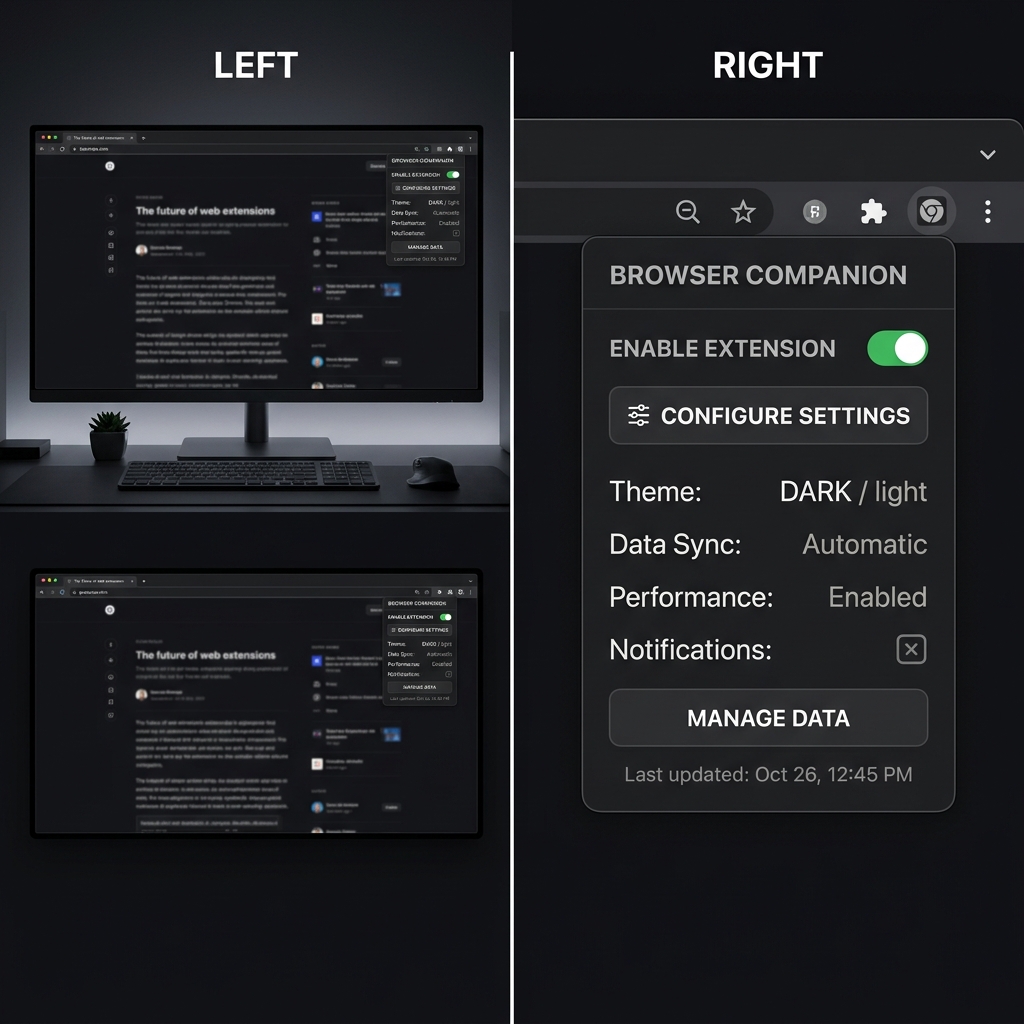
Why Browser Extensions Break Standard Recording Workflows
Standard screen recording software captures a rectangular region of your display at whatever resolution you set. It does not understand that 90% of the current frame is irrelevant and 10% is the thing your viewer needs to see. It does not automatically compensate for the fact that the UI element you are demonstrating is tiny and off to one side. It just records exactly what is on screen.
For recording a full-screen application—a project management dashboard, a design tool, a code editor—this approach works adequately. The application fills the frame. The UI is large enough to read at reasonable playback resolutions. Post-production zoom can be added where needed.
For browser extensions, this approach fails completely. The extension does not fill the frame. The UI is not large enough to read. And the post-production zoom that might work for a full-screen app still has to be manually positioned and timed for every popup open, every button click, every settings screen navigation.
The math of this is unforgiving. A ten-minute extension tutorial might have sixty distinct interactions: opening the popup, clicking between tabs, toggling settings, using the extension on specific page content, accessing the options page, demonstrating integration with other tools. Adding clean, timed zoom to sixty interactions in post-production is not an afternoon task. It is a full day of editing work for a ten-minute video.
The Specific Visual Problems That Make Extension Recording Difficult
The Scale Problem
Browser extension popups are typically between 300 and 600 pixels wide. A full 1920×1080 screen has 1920 pixels of horizontal width. This means the extension popup, when recorded full-screen, occupies somewhere between 15% and 30% of the horizontal screen width—and the same proportion of the horizontal video frame.
That ratio is devastating at common playback sizes. On a phone screen displaying your video in a social media feed, those 15-30% of the frame might correspond to 50 to 100 actual screen pixels on the device. Text at that scale is unreadable. Button labels disappear. The icon-based interface that looks perfectly legible at 100% on your monitor becomes indistinguishable at that size.
This is not a compression artifact issue that better export settings will solve. It is a fundamental scale mismatch between the size of the UI you are recording and the size at which it will be watched.
The Context Pollution Problem
Browser extensions cannot be cleanly separated from their environment. They live inside a web browser, which means any recording of an extension includes everything else that a web browser contains: the current URL, the tab bar, the bookmarks bar, the browser extension row (which may show a dozen different extension icons aside from the one you are demonstrating), and the content of whatever page is currently loaded.
Each of these elements introduces visual noise that competes with the extension you are trying to show. A viewer watching your extension tutorial is also looking at your bookmarks, your other extensions, your current URL, and whatever website you happened to have open. Their attention is being divided without their consent.
For developers recording marketing videos for their extensions, this context pollution is particularly damaging. You are trying to present a polished, professional product. The recording is showing a cluttered, personal browser environment. Those two things are in direct conflict, and the conflict damages the perceived quality of the product.
For educational creators recording extension review or comparison videos, the browser clutter creates editorial noise—viewers are looking at your personal setup rather than the extension being reviewed.
The Precision Navigation Problem
Extension interfaces are dense. Buttons are small. Toggles are compact. Dropdown menus open in constrained spaces with options listed in tight rows. Navigating these interfaces quickly and accurately requires precision that is hard to maintain during a live recording.
The challenge compounds when you add the recording context. People move their mouse differently when they know they are being recorded—sometimes faster due to nerves, sometimes more carefully and artificially, neither of which produces natural-looking movement on video. The result is cursor motion that either looks jerky and imprecise, or looks unnaturally slow and hesitant.
For a small extension interface, even minor cursor imprecision is highly visible. A cursor that overshoots a button by three pixels in a full-screen application is barely noticeable. A cursor that overshoots a button by three pixels in a 400-pixel-wide extension popup is a significant visual event.

What Chrome Extension Recordings Actually Need
Understanding these three problems makes the requirements clear. Recording a browser extension well requires capabilities that go beyond what standard screen recording tools provide.
Intelligent Zoom Targeting
The recording needs to zoom into the extension popup when it opens, stay zoomed in while the popup is being interacted with, follow the cursor to relevant areas of the popup as the tutorial progresses, and zoom back out or reframe when the tutorial moves to a different context—such as showing the extension's effect on page content, or navigating to the options page.
This zoom behavior cannot be static. An extension tutorial involves many different interaction zones, and the zoom needs to intelligently track which zone is currently relevant rather than being pre-set to a fixed crop.
The fundamental requirement is auto-zoom that follows interaction rather than being manually keyframed. For extension recording specifically, where the interaction zone changes frequently and rapidly, capture-time auto-zoom is the only approach that scales without producing an unmanageable editing workload.
Environmental Clean-Up
The recording environment needs to be cleaned up either before recording or at capture time. The goal is to remove the visual context pollution—browser clutter, open tabs, personal bookmarks—so that the viewer's attention is focused exclusively on the extension being demonstrated.
This is harder than it sounds for in-browser recording, because you cannot simply remove the browser chrome. Some of it is visible by design when recording the top of the browser where extension icons live. The practical solution is a recording tool that can intelligently frame the recording around the relevant content and apply visual staging—such as clean backgrounds and contextual framing—that reduces the visual weight of the surrounding browser environment.
Smooth Cursor Motion
Every click in an extension interface needs to look deliberate and precise. Cursor smoothing is more important for extension recording than for almost any other recording context, because the small scale of the interface means that imprecise cursor motion is extremely visible.
The ideal behavior for extension recording is a cursor that arrives at its target smoothly, stays on the target briefly to let the viewer register what is being clicked, and then moves to the next target with the same smooth deliberateness. This is achievable with cursor smoothing enabled—the algorithmic removal of micro-jitter transforms natural hand movement into the kind of precise pointer motion that makes extension navigation look effortless.
Different Extension Types, Different Recording Challenges
Not all browser extensions have the same recording requirements. The challenges shift based on what the extension actually does and how its UI is structured.
Toolbar popup extensions are the most common type—click an icon, get a dropdown menu. These are the most visually constrained and benefit most from immediate tight zoom on the popup. The recording should zoom into the popup the moment it opens and stay focused there for the duration of the interaction.
Page-modifying extensions work differently. Their primary interface is not a popup but a change to the page itself—annotations, highlights, overlays, sidebar panels, content blockers that remove elements. Recording these requires showing the extension's effect on actual web content, which means the zoom needs to follow the extension's UI elements as they appear on the page rather than focusing on a popup in the corner.
Settings-heavy extensions with complex options pages have a recording challenge that resembles recording a web application more than recording a toolbar popup. The options page is typically a full browser tab with its own layout. These benefit from the same principles as any application walkthrough—zoom into settings fields and controls as they are configured—but the starting context is less predictable because the options page design varies enormously between extensions.
Integration-demonstrating tutorials are recordings that show an extension working alongside another tool—for example, a browser extension that integrates with a project management platform, or a writing assistant that works in Gmail. These require the recorder to switch contexts smoothly, showing both the extension UI and the host application it integrates with. The zoom behavior needs to handle both contexts and the transitions between them.
The Developer Marketing Use Case: Why Video Quality Converts
For developers who have built Chrome extensions and are trying to drive downloads, the quality of the demo recording is directly correlated with conversion from the Chrome Web Store listing.
Extension listings in the Chrome Web Store show screenshots and promotional video. For extensions with comparable utility and reviews, video quality is one of the key differentiators that influences whether a viewer downloads or moves on. A blurry, cluttered recording of a small popup communicates that the developer either did not care enough to present their work well, or did not have the skill to produce a clear demo—neither of which inspires confidence in the quality of the extension itself.
A clean, zoomed-in, professional recording of the same extension says something entirely different. It says the developer takes their product seriously, pays attention to how it is perceived, and has thought about how to communicate its value clearly. These are the same qualities that users want in a browser tool they are going to install into their browser and use daily.
This dynamic—where presentation quality signals product quality—is well-documented across software categories. It is the same logic that makes screen recordings of SaaS demos affect trial conversion rates. The recording is not just documentation; it is a trust-building exercise.
Building a Repeatable Extension Recording Workflow
For creators who regularly record extension tutorials—YouTubers covering productivity tools, developers maintaining up-to-date product videos, agencies creating marketing content for browser extension clients—developing a standardized recording workflow is essential.
The core workflow principle is the same as for any high-volume recording context: solve the visual quality problem at capture time rather than in post-production. If every recording exits the camera already zoomed, smoothed, and cleanly staged, the production overhead per video drops dramatically.
For extension-specific workflows, this means configuring your recording tool to be particularly sensitive around the browser toolbar area—where extension icons typically live—so that popup interactions trigger immediate zoom. It also means having a standardized approach to browser environment cleanup before recording: pinning only the extension being demonstrated, using a clean browser profile without personal bookmarks, and having a neutral web page or new tab open rather than personal content.
Cubix Capture handles the zoom and cursor smoothing automatically during capture. Combined with a cleaned-up browser environment and intentional recording practices, it removes the main obstacles that make extension recording difficult and time-consuming.
Why Extension Recording Is Worth Getting Right
Browser extensions are underestimated as a content category. There are hundreds of millions of active Chrome extension installs. The productivity, developer, and creative communities are deeply invested in extension discovery and evaluation. Creators who consistently produce high-quality extension content—clear, readable, well-paced tutorials and reviews—build significant audiences in these communities.
The barrier to entry in terms of recording quality is low. Most extension recording on YouTube and other platforms suffers from the exact problems described in this article: tiny, illegible popups, cluttered browser environments, shaky cursor navigation. A creator who consistently produces clean, well-zoomed extension content is immediately differentiated from the majority of the competition in this space.
This is the same opportunity that exists across any content niche where technical recording quality is currently poor: the gap between what most creators produce and what a well-set-up recording workflow can produce is large enough to create meaningful differentiation with relatively modest investment in the right tools and practices.
Related reading: